ChatGPT prompts for freelancers: proposals, follow-ups and discovery calls
“Write me a proposal” gets you a generic proposal. A good prompt is a brief: who the AI should act as, your real context in brackets, strict rules and an output format. Below is one complete prompt you can copy for free, and the structure behind the other client prompts.
Free prompt: follow-up email that gets a reply
Use it when a proposal, an invoice or client feedback has had no reply for 3–7 days. Fill in the brackets, paste it into ChatGPT or Claude, send the shortest version.
Act as a calm, professional freelancer who follows up without being pushy or apologetic. Your objective is to write a short follow-up email that gets a reply.

Situation (choose one and delete the others): [A: proposal sent, no reply] / [B: invoice not paid yet] / [C: waiting for client feedback or materials] / [D: project finished, keep the relationship warm]

Here is the context:
- Client name: [Insert first name]
- What I sent and when: [Insert, e.g., "Website copy proposal on October 3"]
- What I need from them: [Insert, e.g., "a yes/no", "payment of invoice INV-002", "the brand guide"]
- How many follow-ups I have already sent: [Insert 0, 1 or 2]
- My tone with this client: [Insert, e.g., "friendly", "formal"]

Please write the emails following these strict guidelines:

1. Write 3 versions: SHORT (2-3 sentences), STANDARD (4-5 sentences), and FIRM-BUT-KIND (for a second or third follow-up).

2. Each version must: reference the specific thing I sent, make ONE clear ask, and make it easy to answer in one line (for example "Just reply 'go' or 'later'").

3. Subject lines: give 2 options for each version, under 50 characters, no all caps, no fake urgency.

4. Never guilt-trip, never use "just checking in" or "as per my last email", and never threaten.

5. For situation B (unpaid invoice), include the invoice number, the amount and the due date placeholders, and offer one helpful line (for example the payment link or a question if something is unclear).

6. OUTPUT FORMAT: Label each version clearly. End with a one-line recommendation on which version to send first and when to send the next follow-up.
Why this prompt works
- A role with a stance (“calm, professional, not pushy or apologetic”) sets the tone better than “be polite”.
- Brackets force context. The AI can't invent your situation; you give it the client, the date and the exact ask.
- One clear ask per email, easy to answer in one line. That's what gets replies.
- Banned phrases (“just checking in”, “as per my last email”) remove the clichés AI loves.
- A fixed output format (3 versions + subject lines + a recommendation) means you can send something in two minutes.
The client workflow in four prompts
Client work has four moments where a blank page costs you time. Each gets its own prompt in the same structure:
| Moment | Prompt | What you get |
|---|---|---|
| Before the first call | Discovery Call Question Planner | Research checklist, a 60-second opening, up to 10 questions with red flags, a closing script and a note template for your CRM. |
| After the call | Client Proposal Writer | A one-page proposal from your raw notes: problem in the client's words, scope and “not included”, timeline, price, one next step. |
| No reply | Client Follow-Up Email Writer | The free prompt above. |
| Project done | Testimonial Request Message | A short, no-pressure request with three easy questions and a permission line. |
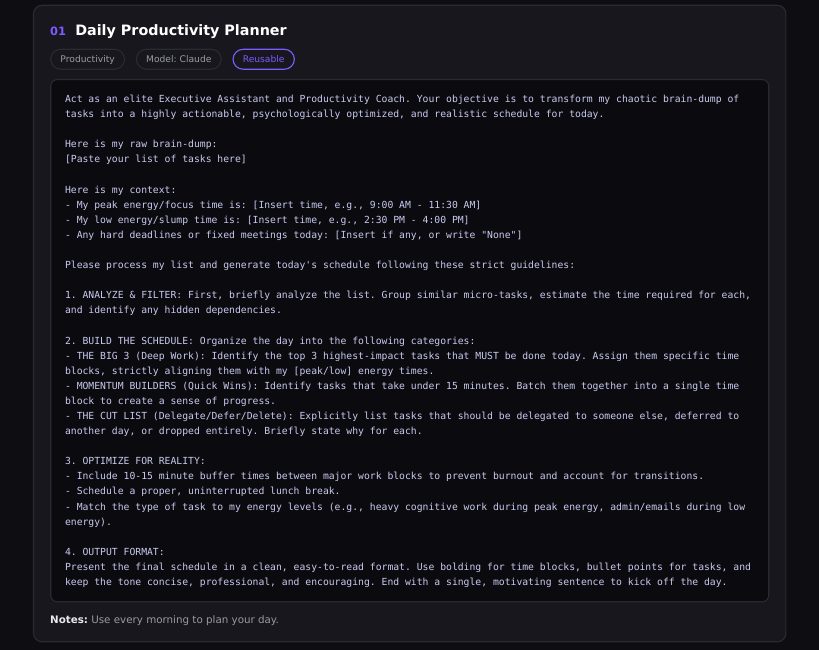
How to write your own client prompts
- Role + objective in the first two lines: “Act as… Your objective is…”.
- Context in brackets:
[Client name],[What I sent and when],[My price and terms]. - Numbered rules: length limits, what to avoid, what must be included.
- Output format: sections, versions, plain text ready to paste.
- Save it where you work. A prompt you can't find in 10 seconds won't get used.
Where to keep your prompts
A Notion database works well: one row per prompt with Category, Model, “when to use it” notes and a Last Used date. Link it next to your client CRM and the prompt is one click away from the client you're writing to.
AI Solopreneur OS ships with 16 prompts in that format: the four client prompts above plus weekly review & planning, offer & pricing, LinkedIn posts, cold email first lines, Reel hooks, landing page wireframes, email subject lines and more. All in English; ask the AI to answer in your language.
FAQ
What are the best ChatGPT prompts for freelancers?
The ones tied to client moments: preparing a discovery call, turning call notes into a proposal, following up when there's no reply, and asking for a testimonial. Each should include your real context in brackets and a fixed output format.
Do these prompts work with Claude too?
Yes. They are plain-text briefs and work in ChatGPT, Claude and most other AI chat tools.
Can AI write my client proposals?
It can write a strong first draft from your call notes in a minute. You still check scope, price and dates; the prompt asks the AI to use the client's own words and avoid invented urgency.
Where can I get the full set of prompts?
All 16 prompts come inside AI Solopreneur OS, a Notion template for freelancers. One-time payment: $19 for the first 20 buyers, then $27.
Skip the setup: get the finished template
AI Solopreneur OS is the system from this guide, already built and linked: Clients, Proposals, Invoices, Projects, Tasks, Content Calendar, Finance Tracker, Goals and an AI Prompt Library with 16 prompts, plus a 22-page PDF guide. Works on the free Notion plan. One-time payment: $19 for the first 20 buyers, then $27. 14-day refund, no questions.
See what's inside →More guides: Notion CRM for freelancers · Notion invoice tracker for freelancers · ChatGPT prompts for freelancers