Notion invoice tracker for freelancers: see who owes you, and since when
If the honest answer to “who owes you money right now?” lives in your inbox, three chats and a spreadsheet, you are guessing. Here is a Notion invoice tracker that answers it in one view, with formulas you can copy.
This is a tracker, not invoicing software. Notion does not send invoices or handle tax. You still create the invoice in your bank, PayPal, Stripe or accounting tool; Notion keeps the overview and reminds you to chase it.
The properties
| Property | Type | Notes |
|---|---|---|
| Invoice | Title | e.g. INV-002 · Northwind final |
| Client | Relation → Clients | Lets each client show total billed and owed. |
| Project | Relation → Projects | Optional, but handy for deposits and final payments. |
| Amount | Number ($) | Invoice total. |
| Issue Date / Due Date | Date | Due Date drives the overdue logic. |
| Status | Select: Draft / Sent / Paid | The only thing you update by hand. |
| Paid Date / Paid Amount | Date / Number | Fill in when the money lands. |
| Days Overdue | Formula | Automatic. |
| Payment Status | Formula | Draft / Sent / ⚠️ Overdue / ✅ Paid, automatic. |
Formula: Days Overdue
Counts days past the due date, but only while the invoice is unpaid:
if(prop("Status") == "Paid" or empty(prop("Due Date")), 0,
  max(0, dateBetween(today(), prop("Due Date"), "days")))
Formula: Payment Status
ifs(
  prop("Status") == "Paid", "✅ Paid",
  prop("Status") == "Draft", "✏️ Draft",
  prop("Days Overdue") > 0, "⚠️ Overdue",
  "📤 Sent")
Use your exact select option names inside the quotes (if your option is ✅ Paid, write that). With these two formulas an invoice turns "Overdue" by itself the day after its due date; you never have to remember to check.
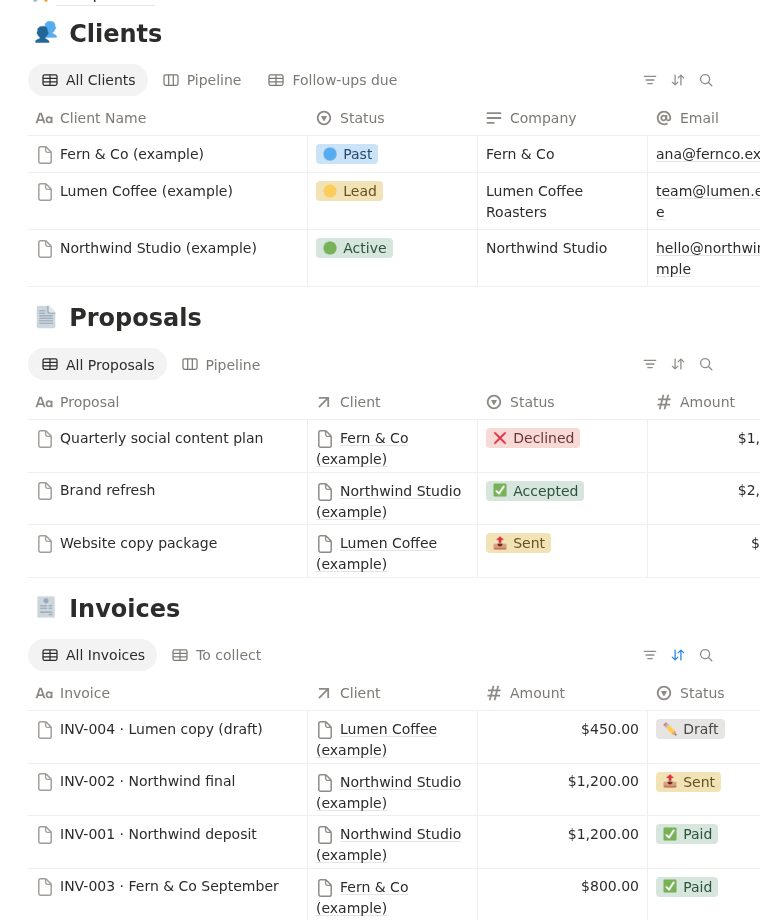
The “To collect” view
Add a table view to Invoices and call it To collect:
- Filter:
Statusis not Paid andStatusis not Draft. - Sort:
Due Dateascending (oldest first). - Show: Invoice, Client, Amount, Due Date, Days Overdue, Payment Status.
That view is the whole answer to “who owes me money and since when”. Add a sum at the bottom of the Amount column (Calculate → Sum) and you also see the total outstanding.
Per-client balance
In the Clients database add two rollups through the Invoices relation: Total Invoiced (sum of Amount) and Total Paid (sum of Paid Amount), then a formula Outstanding:
prop("Total Invoiced") - prop("Total Paid")Now a client page shows what they owe without opening a single invoice. The full client setup is in the Notion CRM for freelancers guide.
Chasing an overdue invoice without being awkward
Most late payments are forgotten, not refused. A short, specific message with the invoice number, the amount, the due date and the payment link works better than “just checking in”. Our free follow-up email prompt writes three versions (short, standard, firm-but-kind) for exactly this.
Weekly money check (Friday, 5 minutes)
- Open To collect. Anything overdue gets a message today.
- Mark payments that arrived as Paid and fill in Paid Date.
- Turn finished work into invoices so nothing stays in Draft.
FAQ
Can Notion track invoices?
Yes, as a tracker: amounts, due dates, paid status and automatic overdue flags with formulas. It does not generate or send invoices or handle tax; use your bank, PayPal, Stripe or accounting tool for that.
How do I mark overdue invoices automatically in Notion?
Add a Days Overdue formula that compares today() with the Due Date while the status is not Paid, and a Payment Status formula that shows Overdue when Days Overdue is above zero. Both are on this page.
Does the invoice tracker work on the free Notion plan?
Yes. Formulas, relations, rollups and filtered views are available on Notion Free.
Is there a ready-made Notion invoice tracker?
AI Solopreneur OS includes this Invoices database linked to Clients, Proposals and Projects, with the To collect view already set up. One-time payment: $19 for the first 20 buyers, then $27.
Skip the setup: get the finished template
AI Solopreneur OS is the system from this guide, already built and linked: Clients, Proposals, Invoices, Projects, Tasks, Content Calendar, Finance Tracker, Goals and an AI Prompt Library with 16 prompts, plus a 22-page PDF guide. Works on the free Notion plan. One-time payment: $19 for the first 20 buyers, then $27. 14-day refund, no questions.
See what's inside →More guides: Notion CRM for freelancers · Notion invoice tracker for freelancers · ChatGPT prompts for freelancers