Notion CRM for freelancers: from lead to paid invoice in one workspace
Most freelancers don't need Salesforce. They need to answer four questions in ten seconds: who should I follow up with, which proposals are waiting, who owes me money, and where did my best clients come from. Here is how to build that in Notion with three linked databases, on the free plan.
What a freelance CRM actually needs
Big CRMs are built for sales teams with pipelines of hundreds of deals. A solo business usually has 3–15 active conversations at a time. What breaks is not volume, it's memory: a lead goes quiet and nobody nudges them, a proposal sits unanswered for two weeks, an invoice is overdue and you only notice at the end of the month.
So the CRM has one job: make the next action obvious. In practice that means three linked lists:
- Clients: every lead and client, with status, source and the date of the next follow-up.
- Proposals: every quote you send, with amount, status and a follow-up date.
- Invoices: every invoice, with due date, paid date and an automatic "overdue" flag.
Link them with Notion relations and each client page shows its proposals, invoices and the money still outstanding.
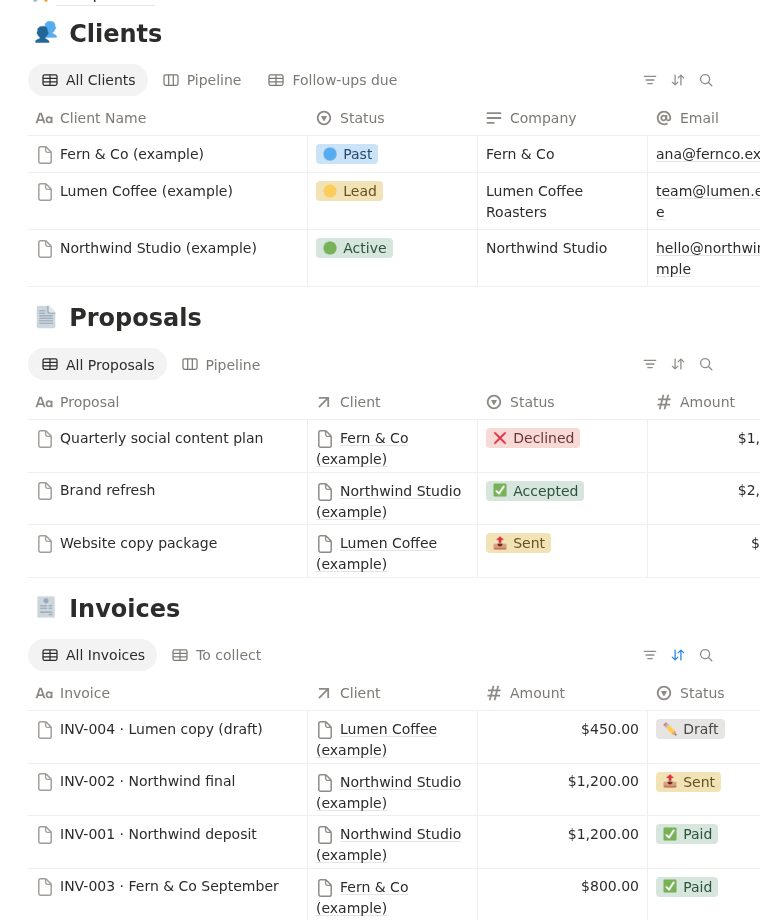
Database 1: Clients
| Property | Type | Why it matters |
|---|---|---|
| Client Name | Title | One row per person or company. |
| Status | Select: Lead / Active / Past | Your pipeline in one column. Board view by Status = a drag-and-drop pipeline. |
| Source | Select: Referral, Instagram, LinkedIn… | After 6 months you know which channel brings paying clients. |
| Next Follow-up | Date | The single most useful field in a freelance CRM. |
| Follow-up | Formula | Shows 🔔 when Next Follow-up is today or in the past. |
| Proposals, Invoices, Projects | Relations | Everything about the client on one page. |
| Total Invoiced / Total Paid | Rollups (sum) | Lifetime value per client. |
| Outstanding | Formula | Total Invoiced − Total Paid: what they still owe. |
The follow-up flag is a one-line formula (Notion formulas 2.0):
if(!empty(prop("Next Follow-up")) and prop("Next Follow-up") <= today(), "🔔 Follow up", "")Then create a view called Follow-ups due: filter Follow-up is not empty, sort by Next Follow-up ascending. Open it every morning; it's your whole sales to-do list.
Database 2: Proposals
A proposal is the step most freelancers don't track, and it's where money leaks. Properties: Proposal (title), Client (relation), Amount (number), Status (Draft / Sent / Accepted / Declined), Sent Date, Follow-up On (date) and a Follow-up formula like the one above, true only while the status is Sent:
if(prop("Status") == "Sent" and !empty(prop("Follow-up On")) and prop("Follow-up On") <= today(), "🔔 Follow up", "")Rename "Sent" to match your select option exactly (including any emoji). Declined proposals stay in the list with a note: a "budget cut, revisit in Q1" is a lead for next quarter.
Database 3: Invoices
Invoices close the loop: Amount, Issue Date, Due Date, Paid Date, Paid Amount, Status, and two formulas, Days Overdue and Payment Status. The full setup with copy-paste formulas is in our Notion invoice tracker guide.
The weekly 10-minute routine
- Open Follow-ups due (Clients) and send the messages. Set a new Next Follow-up date for each.
- Check Proposals with status Sent older than 3 days and nudge them.
- Open the unpaid invoices view and chase anything overdue.
- Move finished clients to Past and set a follow-up in 2–3 months to ask for a testimonial or repeat work.
For the messages themselves, see ChatGPT prompts for proposals and follow-ups: it includes a free follow-up email prompt you can copy.
Does this work on the free Notion plan? Yes. Relations, rollups, formulas, board and filtered views are all available on Notion Free. Avoid the "Dashboard" view type and paid automations; they show an "Upgrade" prompt on the free plan.
FAQ
Can I use Notion as a CRM for freelancing?
Yes. For a solo business with up to a few dozen active clients, three linked databases (Clients, Proposals, Invoices) with a follow-up date cover what a CRM does: pipeline, reminders and money owed.
Do I need a paid Notion plan for a CRM?
No. Relations, rollups, formulas and filtered views all work on the free plan. Only some view types (like Dashboard) and automations need a paid plan.
What is the most important field in a freelance CRM?
The next follow-up date. Most lost work is not lost to competitors but to silence after a call or a proposal.
Is there a ready-made Notion CRM template for freelancers?
Yes. AI Solopreneur OS includes the Clients, Proposals and Invoices databases from this guide, already linked, plus projects, tasks, finances, goals and 16 AI prompts. One-time payment: $19 for the first 20 buyers, then $27.
Skip the setup: get the finished template
AI Solopreneur OS is the system from this guide, already built and linked: Clients, Proposals, Invoices, Projects, Tasks, Content Calendar, Finance Tracker, Goals and an AI Prompt Library with 16 prompts, plus a 22-page PDF guide. Works on the free Notion plan. One-time payment: $19 for the first 20 buyers, then $27. 14-day refund, no questions.
See what's inside →More guides: Notion CRM for freelancers · Notion invoice tracker for freelancers · ChatGPT prompts for freelancers